Inspect STL and 3MF Files Online Without Uploading Your CAD Designs
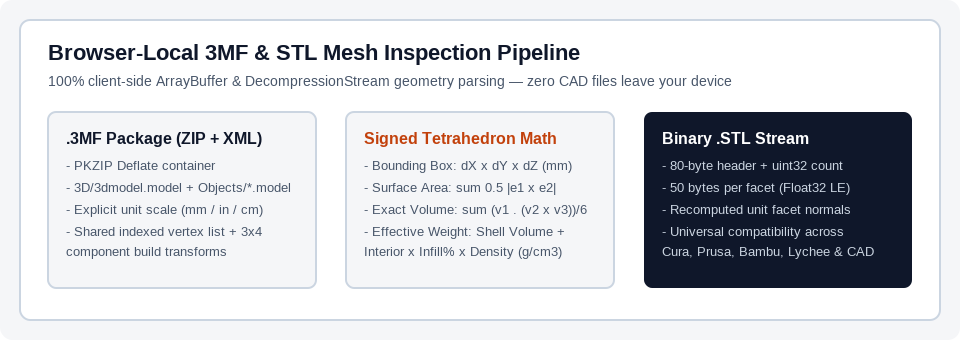
An online STL viewer renders triangle meshes directly inside your browser using WebGL so you can verify XYZ dimensions, polygon density, surface area, and cubic-centimeter volume before opening a desktop slicer. Unlike cloud CAD viewers that upload proprietary customer prototypes to remote storage buckets, Print3DCalc parses every .stl and .3mf file strictly inside local browser memory.
Whether you downloaded a multi-part .3mf project from MakerWorld or Printables, or received a binary .stl attachment from an engineering client on your phone, drop the file into the viewport above to orbit, zoom, pan, and verify printability in milliseconds. Once you confirm the mesh volume, click Price This Print to send the exact cm³ measurement straight into our 3D Print Cost Calculator or batch-export meshes in the 3MF to STL Converter.
How Browser-Local Mesh Volume, Bounding Box & Gram Math Work
Exact 3D mesh volume is calculated by summing the signed volume of tetrahedra formed between every triangle facet and the coordinate origin (V = |sum(v1 · (v2 × v3))| / 6). Because closed manifold 3D printing meshes orient facet vertices counter-clockwise when viewed from outside, interior cavity volumes automatically subtract from exterior shells—giving exact solid volume even for hollow enclosures, threaded bores, and intricate lattice parts.
| Geometry Metric | How It Is Computed | Why Makers Check It Before Slicing |
|---|---|---|
| Bounding Box (X × Y × Z mm) | (maxX - minX) × (maxY - minY) × (maxZ - minZ) |
Confirms whether the part fits a 180 mm mini bed, 256 mm standard bed, or requires splitting. |
| Unit Scale Check (mm vs in) | Applies ×1 (mm), ×25.4 (inch), or ×10 (cm) |
Catches the classic CAD bug where a 4-inch bracket imports into a slicer at a tiny 4 mm wide. |
| Surface Area (cm²) | Sum of 0.5 × |(v2 - v1) × (v3 - v1)| across facets |
Determines outer perimeter wall filament usage and sanding/priming surface area. |
| Signed Volume (cm³) | Divergence theorem tetrahedron sum divided by 1,000 |
Provides exact 100% solid mL volume for resin prints and baseline volume for FDM infill math. |
| Triangle Count | Total indexed or binary 50-byte facets | Flags overly coarse facets (visible stepping on curves) or 2M+ poly sculpts that lag slicers. |
Common STL Scale & Geometry Issues to Catch Before Printing
STL files store raw unitless floating-point numbers rather than explicit measurement units, which is why models exported from Fusion 360, SolidWorks, or Rhino in inches appear 25.4 times too small in millimeter-based slicers. If your model dimensions read 3.5 × 2.1 × 1.0 mm when you expected a palm-sized bracket, switch File Unit Scale in the sidebar to Inches → mm (×25.4) to verify its true physical size and weight immediately.
Toggling Wireframe mode lets you inspect tessellation density along curved fillets and cylindrical holes. Low-resolution CAD exports show flat polygonal facets on round bores that cause tight bearings or M3 bolts to bind; high-density ZBrush or Blender sculpts show dense triangle meshes suitable for 50-micron MSLA resin printing (priceable in our Resin 3D Print Cost Calculator). Switching to Orthographic projection removes perspective distortion so you can check flat bottom bed contact from the Front and Right snap views.